We start by looking at the basic “action” trigger and how it works. Afterwards, we go straight into how we can turn this simple idea into an extremely efficient and effective way to create events that will respond to you differently depending on how you choose to interact with it.
The Action Trigger
As an RPG Maker developer, the first thing you should become familiar with in an event is interacting with it by pressing the action button. This is by default the Z key or the Enter key.
Let’s set up a simple event that greets you:
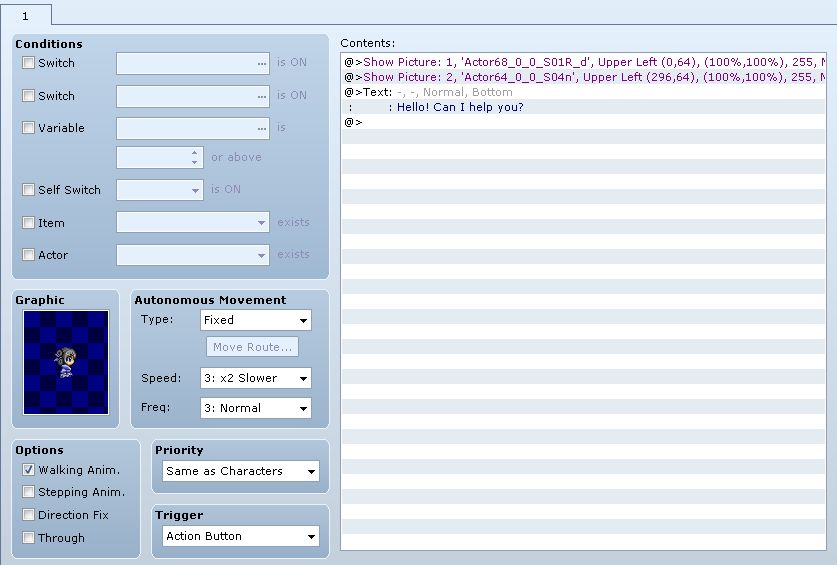
Note the trigger type we use: Action Trigger. This specifies how the event will be triggered.
Without any custom scripts, we use some pictures to make our dialogue seem somewhat more attractive to look at.
Going into the game, we can go up to our event and press the action button, which will set off the action trigger.
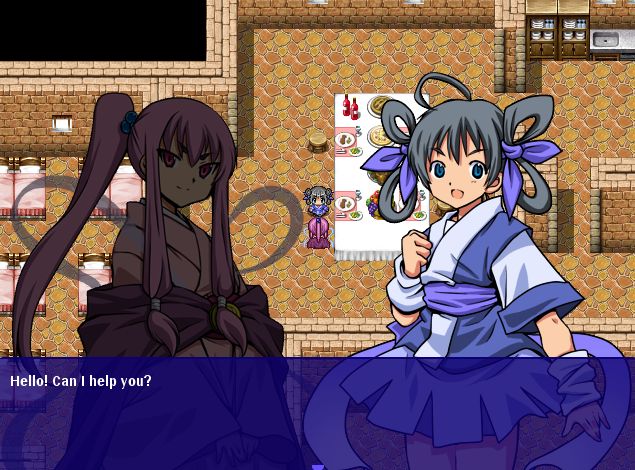
And that’s a basic overview of how the action trigger works. That’s basically all there is to it: you press a button, and the event is triggered.
An Alternate Action Trigger
Suppose you have a card mini-game, and you would like to be able to play cards with different NPC’s that you see in the game. Perhaps the card game has its own set of quests and you have to defeat certain characters in order to complete the quests.
Or suppose you have a pickpocket system where you can press a certain button when you’re facing NPC’s, and instead of talking to them, you would instead trigger a steal action that would determine whether you successfully steal from the NPC or not.
There are many possible use cases, and it would be very convenient if we can implement the event sequences while providing an easy way to maintain them.
Want to learn how? Read the rest at Hime Works!