AnimaX - extended characters animations and visual equipment

● ARCHIVED · READ-ONLY
Started by Pheonix KageDesu 20 posts View original ↗
  1. AnimaX 1.2
    Pheonix KageDesu


    Introduction
    Extended characters animation system with layers support


    [embedded media]


    Features:

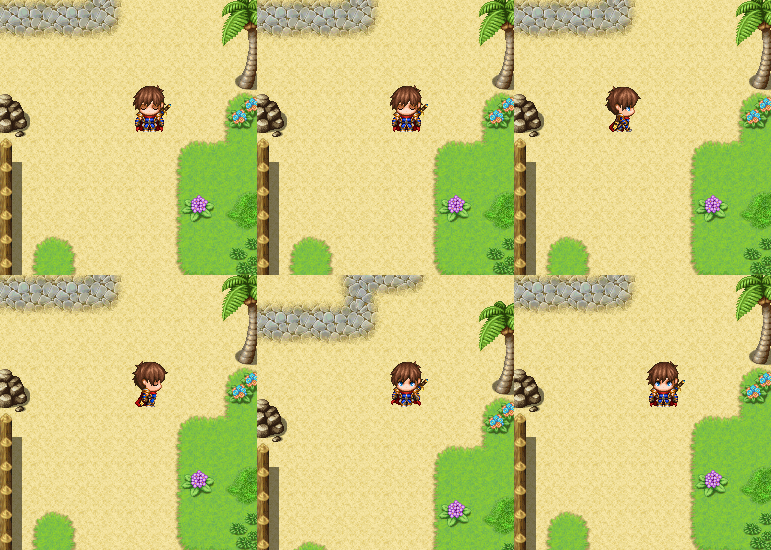
    • Separate images (frames) animation images structure (not spritesheets)
    • Idle animations
      • 3eb332ad81c7dc9e23e19750d47de1b3.gif
    • No frames count limit
    • Animation actions
    9bd07f4e96a9b94bd5b1b181afaa3004.gif

    • Changing animation sets during game depends on equipment
      • 70add03dea5aebf8569aebbba2565cf0.gif

    • Flexible settings in plugin parameters for each animation
    • Events support (you can assign animation to any event), easy to change
    • Extra layers (visual equipment) with very flexible settings
    • Diagonal animations
    • 1e4bd365ac2e8d454fb57a66899ef614.gif


    How to Use:

    Watch video for better understand how plugin working and what can do

    All actual plugin instructions and commands are listed in the plugin help section

    Plugin have Demo Projects for MV and MZ

    Detailed guide: https://kdworkshop.net/animax-plugin-guide/


    Download:

    From this shared folder

    Terms of Use:

    Creative Commons 4.0 Attribution, Share Alike, Non-Commercial

    (Attribution Non-Commercial Share Alike, cc by-nc-sa)

    You can use plugin in non-commercial project for free

    For using plugin in commercial projects you should obtain another license
  2. Plugin is complex and powerful, but for now is only version 1.0, may be some bugs, so, if you find any bugs, glitches, let me know in this thread please. Also will be good to hear some suggestions.
  3. Hi Phoenix KageDesu very nice plugin you have there,

    i have been looking for a long time after a Character Layer plugin not for the map but for the side view battle, actually what you show here characters with equip layers, so that you can change as an example the head, sword, shild, accecories, everything your plugin can but only for the Side View Battle.

    Do you have plans to make something in that direction? Or is it possible to put it on your "Release Later List"? I think many would be interested because there is no such working plugin yet and it has immense potential, I can also imagine that this plugin would sell really well because there isn't any.

    When you have such Plans, please in MV.
  4. Update 1.2 available


    Changelog

    • Added support of .webp animation images support (.webp more faster and lightweight), see plugin parameter: Is Use .Webp?
    • Added all animations preload option (alternative preload, see plugin parameter: Is Use Alt.Preload?). Recommended to use who have flickering issues.
    • Added Alpha NET Z compatibility

    AnimaX animations autosynched in multiplayer game for all charcters and events. So, not need any special configuration for Alpha NET Z, just plug and play. But if you want play some animation localy you have this opportunity also, see plugin help section.
  5. Pheonix KageDesu said:
    AnimaX 1.2
    Pheonix KageDesu


    Introduction
    Extended characters animation system with layers support


    Features:

    • Separate images (frames) animation images structure (not spritesheets)
    • Idle animations
      • 3eb332ad81c7dc9e23e19750d47de1b3.gif
    • No frames count limit
    • Animation actions
    9bd07f4e96a9b94bd5b1b181afaa3004.gif

    • Changing animation sets during game depends on equipment
      • 70add03dea5aebf8569aebbba2565cf0.gif

    • Flexible settings in plugin parameters for each animation
    • Events support (you can assign animation to any event), easy to change
    • Extra layers (visual equipment) with very flexible settings
    • Diagonal animations
    • 1e4bd365ac2e8d454fb57a66899ef614.gif


    How to Use:

    Watch video for better understand how plugin working and what can do

    All actual plugin instructions and commands are listed in the plugin help section

    Plugin have Demo Projects for MV and MZ

    Detailed guide: https://kdworkshop.net/animax-plugin-guide/


    Download:

    Demo Project MV: download
    Demo Project MZ: download

    Version 1.2 (plugin file only)
    For MV and MZ: github (click -> download ZIP)

    Terms of Use:

    Creative Commons 4.0 Attribution, Share Alike, Non-Commercial

    (Attribution Non-Commercial Share Alike, cc by-nc-sa)

    You can use plugin in non-commercial project for free

    For using plugin in commercial projects you should obtain another license

    So... How to obtain that "another license" for commercial project? If I'm creating a patreon project, how much will it cost?
  6. @hacksider, please, go to the plugin official webpage and scroll to "Plugin Versions" section and you will see detailed answer on your question.

    P.S. Right now Christmas discounts in my Shop btw
  7. Hello, great plugin so far but diagonal mouvement is not working. You need to have Alpha ABS Z for it to work.

    Could you add the diagonal movement feature directly to AnimaX ?

    EDIT: Ok, i just found it can be activated with Mobile Control plugin. (sorry ^^)
  8. This seems very nice, but I'm not sure what license I have to obtain to use it commercially.
  9. pennylessz said:
    This seems very nice, but I'm not sure what license I have to obtain to use it commercially.
    If you go to the page on their site for the plugin itself (not the guide they linked here) you can see the terms of use for each version waaaaay down on the bottom. It appears that the 'pro' version of the plugin is the commercial use license. Poking around a bit more suggests you get that through either the Patreon subscription or a one-time payment of ~$24 USD.
  10. Oliin said:
    If you go to the page on their site for the plugin itself (not the guide they linked here) you can see the terms of use for each version waaaaay down on the bottom. It appears that the 'pro' version of the plugin is the commercial use license. Poking around a bit more suggests you get that through either the ******* subscription or a one-time payment of ~$24 USD.
    Well the plugin is very nice, it might be worth the price. Even though I personally don't think plugins should cost that much.
  11. Would this allow me to have a walk animation that goes 123456123456 or 12345654321?

    I'm currently looking at Galv's Character Frames plugin, but it doesn't have all the capabilities of this, so I'm asking if this can do what that does.

    Also, what are the chances this is compatible with Visustella?
  12. pennylessz said:
    Would this allow me to have a walk animation that goes 123456123456 or 12345654321?

    I'm currently looking at Galv's Character Frames plugin, but it doesn't have all the capabilities of this, so I'm asking if this can do what that does.

    Also, what are the chances this is compatible with Visustella?
    Walking animation is from 1 to X (end) and again. So 123456123456. 0 (zero) frame only used when character is stay still, it's not used in movement loop.

    You can download free version and try in your project with VisuStella.
    Free version (basic version) is same as PRO, just have little limitations, but code is same.
    https://kdworkshop.net/plugins/animax/
    Better download Demo project, becouse plugin settings is not easy, better have examples from Demo
  13. Looks like this is incompatible with Qplus / Qmap?

    Edit: Nvm, works when I bought the pro version.
  14. Seems like a good plugin
  15. Is there a recommended workflow for creating the assets with the frames being their own individual images?
    I had to do an entire set where I use asesprite and set up custom splicing and exporting, which has been a hassle, since its made to export an entire image at once or a spritesheet, not individual frames with specific naming conventions.
    Edit: I think I figured out a good way to automate the exporting. If I like it I'll make a tutorial on it and DM it to you for permission to put here.
    Other question- the layers you have like Hat and Wings can also be custom for the Actions right? Do you give them a custom name for the action in its own folder, or does the Actions folder have its own layers folder?
  16. EasternOceana said:
    Is there a recommended workflow for creating the assets with the frames being their own individual images?
    I had to do an entire set where I use asesprite and set up custom splicing and exporting, which has been a hassle, since its made to export an entire image at once or a spritesheet, not individual frames with specific naming conventions.
    Edit: I think I figured out a good way to automate the exporting. If I like it I'll make a tutorial on it and DM it to you for permission to put here.
    Other question- the layers you have like Hat and Wings can also be custom for the Actions right? Do you give them a custom name for the action in its own folder, or does the Actions folder have its own layers folder?

    In update 1.3 you can use spritesheets
    https://kdworkshop.net/animax-update-1-3-overview/

    If you want make some tutorial, you can publish it, even without my permission

    Layers should have same name as Action and Layers always in own folders.
    Layers can be in CommonLayers (for all) or in folder for certain character

    Snag_5d997935.png
  17. Hello! This plugin looks fantastic, but the demo project links are dead. Any chance you could re-upload them please? Thank you!

    EDIT: Ah nevermind, I found them on your other pages.

    For others: https://kdworkshop.net/plugins/animax/
  18. kronchybitz said:
    Hello! This plugin looks fantastic, but the demo project links are dead. Any chance you could re-upload them please? Thank you!

    EDIT: Ah nevermind, I found them on your other pages.

    For others: https://kdworkshop.net/plugins/animax/
    Thank you. I have updated the link.
  19. Hello @Pheonix KageDesu, is the tutorial complete? I mean there is "Add extra layers to character" with plugin commands, but then suddentle th article ends with no explanations at all?
  20. @Pheonix KageDesu, I wanted to report that there's some kind of "bug", but not sure we can name it a bug, anyway...Before all the frames are played, character animation (moving, 7 frames per direction) are played slower than it should be. For a while, when you walk a little on the map and all frames was player before, the animation frameskip is back to normal - the one I want it to be, set in plugin configurations. When I change map, the same thing happen again. I tried to change preload pictures to true in plugin params, but it does not fix the problem.