The Free Archives (Formerly Animations Archive)

● ARCHIVED · READ-ONLY
Started by hadecynn 20 posts View original ↗
  1. [embedded media]

    6/15/2020

    Today we're happy to announce the revival and rebranding of the former Animations Archive. As many of you are aware, the free resources we've posted here have become hard to get a hold of over these years. To solve this issue, we've decided to put everything on itch.io where they'll be more permanently available and easier to manage.

    The Free Archives will be released periodically and will contain remastered versions of free assets released since 2016, experimental prototypes, and other assets crafted by Dreams Circle that do not fall into our flagship brands. These assets are designed for game production but can be used for anything as long as the Terms of Use are followed.

    Note that whereas the old Animations Archive releases were set to 20FPS, these remastered assets have all been made at 30 AND 60 FPS, so they're perfectly compatible with all of our paid assets (Animations Collection and Animations Select).

    Without further ado:
    The Free Archives Vol.1 by Dreams Circle
    Enjoy!
  2. WOW these are beautiful, I gotta comment.... MORE PLEASE!!! Thank you very much!


    `Welcome to the community master spell maker!  :p
  3. Let's end the day with a bang (literally).


    Unfortunately, since we are forced to scale every cell into 192x192, a lot of the quality and particle effects can't be seen. Is there any plugin masters out there willing to write something that will allow the use of any cell sizes of our choosing? 


    === GIF Showcase === 


    Dia (Bonus points if you know where this name comes from)


    20160118_XDia.gif


    === PNG Download ===


    Dia - Full Animation - https://www.dropbox.com/s/2mo1gzj2p83nxdf/XDia.png?dl=0


    ==================
  4. Thanks for making these nice animations. :)  
  5. Good morning RPG Maker Forums! Let's start the day with a quick jolt.


    === GIF Showcase === 


    Thunder


    20160119_XThunder.gif


    ====================


    Using this is a bit tricky, as it is my first attempt to make a 2-piece animation in an effort to circumvent the size issue. 


    Please thoroughly read the instructions before asking questions on how to use this: 


    === Instructions ===


    1.Below you'll find two animation sheets, XThunder1 and XThunder2. XThunder1 contains the thunderbolt effect that comes down from the sky, XThunder2 contains the explosion + dust that occurs after the bolt hits (can also be used as just a standalone explosion).


    2. Of the two, XThunder2 is very straight forward, you can just tween the cells continuously to get the effect.


    3. However, the "length" of the bolt in XThunder1 is spliced into 3 pieces. The top pieces are from cells 1 ~ 15, the middle pieces are from cells 16 ~ 30, and the bottom pieces are from cells 31 ~ 45. Due to the way that the bolt is "slowly" reaching downward, there are a lot of empty cells for the middle and bottom sections. This is not a mistake, they are intentionally left blank because I figured it would be easier to match the cells up. (There are also some blank cells at the start and end to take into account the timing; if you are experienced and know how to time things yourself, feel free to adjust as you see fit)


    4. In the animation window, take the first frame and put the first cell of each piece (1, 16, 31) and stack them like so:
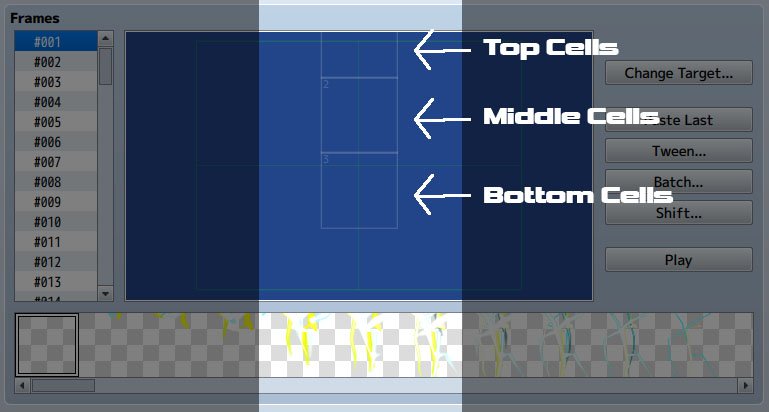

    Instructions.jpg


    5. For the next frame, you would keep the positions of the 3 cells the same, but replace them with the next cell in their respective set (2, 17, 31).


    6. Repeat until you've placed all the cells for the first 13 frames. Now you should have the completed bolt effect.


    7. Now you need to decide where you want to put the explosion. After deciding the location, take Cell 112 ~ 175 into frames 12 ~ 75 (customize-able if you don't like the default timing) onto that same location, and you should have the explosion ready to go.


    NOTE: As a special bonus for this first-time experiment, the animation sheets for XThunder1 and XThunder2 are both in 60 FPS! If you are not running RMMV with customized battle animation speeds at 60 FPS, however, the animation might be too long, so you'll need to decide whether or not to prune it down manually. For example, if you are okay with the speed of the bolt, but find the explosions too slow, you would keep frames 1 ~ 12 the same, but use only odd-numbered cells (113, 115, 117, etc.) for the explosions from frames 12 ~ 45. LIkewise, if you want to shorten the length of the bolt, you would do something similar for the first 12~13 frames, just remember to match the three parts.


    === PNG Download ===


    Thunder - Component 1 - https://www.dropbox.com/s/6s50dn90n53yqyy/XThunder1.png?dl=0


    Thunder - Component 2 - https://www.dropbox.com/s/68u61poiwmbcgi1/XThunder2.png?dl=0


    ====================


    If you are experiencing some slowdowns during the first cast of the spell, I would recommend pre-loading the animation images with a plugin to make it run smoother. There should be no problems after the first use either way.
  6. This animations are awesome! I hope you'll keep doing more of these!  :D
  7. Tsukihime said:
    Very detailed animations. I'll be sharing them on Twitter if you don't mind!


    Not at all, its my pleasure. Also, knowing how great your plugins are, if you could think about the viability of making a plugin that will allow use of bigger cells (say 386x386) somehow, that would be amazing!
  8. I love these, they are super duper flashy and super cool!  :rhappy:


    Edit: I wanted to know if you still have the Animation.json file from the data folder? If it's ok, could you upload it for us to use?
  9. Things are starting to heat up! This one is pretty straight-forward to use, and you can also pile them up in the MV animation engine and just watch the world burn, because some people like to do just that.


    === GIF Showcase ===


    Fire


    20160119_XFire.gif


    === PNG Download ===


    Fire - https://www.dropbox.com/s/gjkmei059sxwsaq/XFire.png?dl=0


    ====================


    Enjoy!
  10. Kloe said:
    I love these, they are super duper flashy and super cool!  :rhappy:


    Edit: I wanted to know if you still have the Animation.json file from the data folder? If it's ok, could you upload it for us to use?


    You mean for XThunder? Everything else should be pretty straight-forward?
  11. Very nice indeed! :D
  12. hadecynn said:
    You mean for XThunder? Everything else should be pretty straight-forward?

    Yeah, I mean you dont have to, but I would just think it would help people with them!
  13. I would LOVE it if you posted the Animations.json file with all of your animations on it. It would make it easier to copy and paste the new ones (changing the ID of course) and add them to our game without having to make each one from scratch. That is, if you have them already in place in a game..
  14. Kloe said:
    Yeah, I mean you dont have to, but I would just think it would help people with them!


    wrigty12 said:
    I would LOVE it if you posted the Animations.json file with all of your animations on it. It would make it easier to copy and paste the new ones (changing the ID of course) and add them to our game without having to make each one from scratch. That is, if you have them already in place in a game..


    Unfortunately, I'm using the 60 FPS versions in my own game, so the animation data I have on record won't work for the 20 FPS sheets here. Going forward, however, I will remember to keep a copy of the sample game's animation file that I use with the default engine to test out the 20 FPS versions with.
  15. And here we have another case of "I wish we could use bigger graphics". Ideally, this would be for a screen-wide all-enemy attack, but scaling it up too high makes it ugly, so the temporary solution is to make it a single-target animation.


    === GIF Showcase ===


    Starlight


    20160119_XStarlight.gif


    === PNG Download ===


    Starlight - https://www.dropbox.com/s/z7ycbzif2tx1e6a/XStarlight.png?dl=0


    ====================


    Enjoy!
  16. hadecynn said:
    Spoiler
    View attachment 29182


    === Animation.json Download ===


    DO NOT replace your project's Animation.json with this file. Open this in a new sample game, then copy/paste the animation from the animation editor into the one for your project. 


    View attachment 29185


    ====================


    Enjoy!


    Thanks for the instruction and these beautiful animations! Super Amazing!  :thumbsup-left: :rwink:  
  17. Very nice animation.


    The only thing that i would suggest is to avoid having animations that comes out of the frame like the Dia one, using them as a single target gives a very bad aspect and those are better for animations that should cover the whole screen, that way the border is not noticeable.
  18. @hadecynn  please avoid double posting, as it is against the forum rules. You can review our forum rules here. Thank you.


    If you need to add something, you can go back and edit your last post.
  19. mlogan said:
    @hadecynn  please avoid double posting, as it is against the forum rules. You can review our forum rules here. Thank you.


    If you need to add something, you can go back and edit your last post.


    Will do. Just curious, what if I run out of space for attachments though? With the GIFs and PNG, each animation would take up around 1+ MB to start. Ideally I'd love to just edit the first post too.