[ACE]Sapphire Action System installation issues + other scripts

● ARCHIVED · READ-ONLY
Started by jknightandkarr 20 posts View original ↗
  1. I installed the current version oh Khas Sapphire Action System into a game I am creating, and it starts but after my intro screen I created after hitting new game. It goes black, freezes for a few seconds and then this error pops up.

    error_zps589586a0.png

    I copied all the scripts into mine, but it won't start for me. How can I fix this error. I haven't really done any scripting, so I'm not sure what I did wrong. No other scripts installed except for

    Graphics.resize_screen(640,480)

    and

    def greet_one
      var = "Thank You For Playing!"
      msgbox_p(var)
    end

    def greet_two
      RPG::BGS.new("River", 100,100).play
      #Audio.bgm_play("Audio/BGM/Battle1", 100,100)
      hello = "Presents"
      msgbox_p("TITANIC Electronics and Games", hello)
    end

    greet_one()
    greet_two()

    This is one I did from watching DiamondandPlatinum3's RGSS3 scripting vids
    .

    Joe
  2. 1) Please post a link to the script version you're using.


    2) How did you configure the SAS?


    All of the ABS-Scripts require a lot more than simply put in the scripts - they change the engine in so much ways that you need to follow their instructions correctly, especially when setting up the required data for items and skills.
  3. http://www.mediafire.com/download.php?1exy8cl0np2ycts

    Here's the script.

    I copied the scripts in there order from teh demo, but if there's other stuff to do I missed how to start it. Found $game_map.refresh_table(start_x,start_y,end_x,end_y) and one on "Physics" but after a search through all the scripts they only appear in the script called Sapphire Action System IV.

    After i get this one, I got a 2nd script I was trying to start, but I'll deal with that  script next.

    Joe
  4. I saw the stuff under the weapons and enemies menu's is that what is keeping the script from starting or is it something else?
  5. jknightandkarr said:
    I saw the stuff under the weapons and enemies menu's is that what is keeping the script from starting or is it something else?
    Andar said:
    2) How did you configure the SAS?


    All of the ABS-Scripts require a lot more than simply put in the scripts - they change the engine in so much ways that you need to follow their instructions correctly, especially when setting up the required data for items and skills.
    As I stated above, simply copying the scripts is NOT enough, you need to configure everything.
    There should be instructions on how to configure the ABS, either at the beginning of the scripts or on the website where you got it. Please read them and follow those instructions - most probably you're missing a lot of notetags and/or several script-line modifications.


    DO NOT copy those infos from the demo - you need to place your own info into the game to make it follow your data, that's why you need the instructions.
  6. Ok I have been trying to deal with the Sapphire Action System IV again. I looked over EVERYthing between my game and the demo and I can find NOTHING of my problem. I found the script commands and installed them.

    "$game_map.start_sas"

    "$game_map.sas_hud.show(true)"

    but I have narrowed my problem down to $game_map.sas_hud.show(true), the screen just blacks out and sits there and eventually i get the error message from the first post... but I have started making weapons, so I am not sure what the problem is?? I've looked over the demo for the Sapphire Action System on every event in the start of the demo, looked at the instructions, at the scripts, and I can find NO source as to the issue of this problem. I am trying to look over everything a again, but so far I don't see the problem(s)..

    Joe
  7. So far I still cannot find the issue...

    Joe
  8. Maybe something's wrong in your weapon database?
  9. 1) did you follow the instructions in the PDF when installing the SAS?


    2) did you configure the switches used by the SAS and reserve them to prevent double use?


    3) did you copy all neccessary pictures, without changing names and to the same folders?
  10. Thanks for the assistance, Just a note, I have installed, V's Relationship/Bio Window Ver 2.5 script, but as I got the weapons error before I don't think that's the issue, but it could be part of my delay problem.

    nightdragon said:
    Maybe something's wrong in your weapon database?
    I thought of that. In an effort to try and get it working, I have copied everything I can from the data base, events & game in order to see if any of that was the issue. Not including monsters, chest, the vines, stuff like that, only the beginging events.

    Andar said:
    1) did you follow the instructions in the PDF when installing the SAS?
    2) did you configure the switches used by the SAS and reserve them to prevent double use?
    3) did you copy all neccessary pictures, without changing names and to the same folders?
    Yes I have been over that doc several times and the only thing on weapons it mentions are already done, but I will go over it again just in case there's something else..

    Let me recheck those, but I think that's all done, but I will  recheck.

    Yes, I copied all the pics to the same source on my game.
  11. Has the actor an equipped weapon, preferably by default in database? Is the hero added to the party by database default (system tab top left)?


    Because the line where the error is reported checks for equipped weapons...


    It looks like the problem is connected to actor data, which means it can be an incompatibility with any script changing how the actors are handled.
  12. I tried removing the weapons n same thing. I do have an opening sequence and the character does change from an elder talking to the player. I removed that and just had the elder. And the screen does not give error but the hud is not present. So i am going to have to look at redoing my opening....

    Joe
  13. Does the player has to control the elder during opening? If not, it would be better to make the opening an automatic cutscene while the party containing the true player remains invisible.
  14. Andar said:
    Does the player has to control the elder during opening? If not, it would be better to make the opening an automatic cutscene while the party containing the true player remains invisible.
    Ok this is how the opening works. The elder is the initial playing character, but there is no control, the sequence auto starts. There is a short talk to the player looking at the screen, the elder asks for your name, asks you if your male/female. Next step, (not fully implemented) asks you about what race you want to be, just like in the Elder Scrolls series. Then ending talk then black out, transfer, back in. The "$game_map.start_sas" "$game_map.sas_hud.show(true)" commands are between the after the fade out and before transfer commands. And during the fade out as well as before the transfer along with the SAS startup script commands is the Elder getting removed and the real playable char getting put into place. I tried to copy the script and place it into this window, but that didn't work. If all else fails, I will just zip my game up and place the demo for download.

    Joe
  15. If the player does not move the elder by keyboard, then there is no need for the elder to be an actor - he can be a regular event in that case. You can either change the real player with the event commands if he is already in the party, or you can start the game with an empty party and add the player at the end of the scene as you've done.


    make sure that all "change party member" commands are finished before the SAS is started - this is also easier when all cutscene commands are in a single controlling event and rather difficult if you have split your scene among different events (I don't know how you did it).


    Also: any transfer command to a different map ends the event processing - if the cutscene transfers to a different map before it's completed, all commands after the transfer (including the fade-in on the new map) should be in an autorun on the new map.
  16. Andar said:
    If the player does not move the elder by keyboard, then there is no need for the elder to be an actor - he can be a regular event in that case. You can either change the real player with the event commands if he is already in the party, or you can start the game with an empty party and add the player at the end of the scene as you've done.

    make sure that all "change party member" commands are finished before the SAS is started - this is also easier when all cutscene commands are in a single controlling event and rather difficult if you have split your scene among different events (I don't know how you did it).

    Also: any transfer command to a different map ends the event processing - if the cutscene transfers to a different map before it's completed, all commands after the transfer (including the fade-in on the new map) should be in an autorun on the new map.
    My cutscene is on 2 different event pages on the first event. First the elder asks for your name after a short speech. Then it asks which sex you are. After a conditional branch check of which switch is thrown, Male or the female switch. It goes into asking what race you wish to use(This isn't ready yet. No graphics at the moment), and that will just use the "change actor graphic" to adjust the main character. Then just throws "Self switch A=1" then pg 2 of the event.

    Pg 2 starts with a 2nd conditional branch checking which sex you chose. Both just makes the elder say "Your name is XXXX and you are (male or female), and when I have it ready the elder with also tell you the race your choosing to use. And this is conditional branch 3 asking if this info is correct (Yes/No) If no, jumps back to a label just before the elder asks for name. If yes, The elder just says a 2nd short speech, followed by BGM fadeout, screen fade out, Removes elder from party, adds Actor # 001(which ever the players choosen looks via the event editor) then transfers to the main world map. And that map now holds an event starting the S.A.S. I'm sure there probly was other ways to do the intro, but since I really don't know the scripting language, I just used the event editor and repeated tries and fails till I got it working.

    Anyhow, I moved the start of the Sapphire Action System (S.A.S.) onto my map where the player actually takes control starts, so I can make my intro how I want and still have the S.A.S. After moving some sounds from the demo into my game, it now no longer crashes, but the HUD in the system is a no show. I can't seam to find any graphics on it, yet anyhow. Guess they could be in an alt directory from rest of the graphics, I will have to search, but the intro to world map fade out and fade back in is kinda long. I will temporarily remove the V's Relationship/Bio Window Ver 2.5 script and see if that fixes the long  delay or if it's from my world map. I saw something about the S.A.S. isn't recommended on Lg maps, that could also cause the delay I guess. My next playing with RPG maker will tell.

    I have found some global switches and variables, that I need to include. I noticed there was a switch to enable the sword, so far on my searches, I haven't found where to include that at, yet, but I will find that eventually. If I can't find the graphics for the hud, if there are any, why is the hud not showing?? Thanks for the help.

    Joe
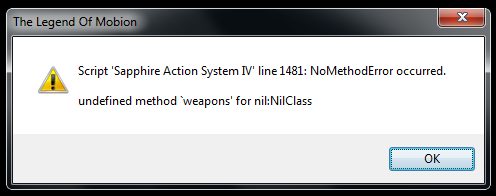
  17. At the moment of the error, the script checks the $game_party.members[0], which is nil.

    That means that - somehow - you do not have a member at your party!

    You may check this error by placing the following code before the line of the error:

    print "Party: #{$game_party.members}\n"

    Please copy the console output after this test!

    Also, when changing actors you need to call (if you are using the multiple actors add-on):

    Multiple_Core.refresh

    The HUD graphics are on the Graphics/System folder and you need to copy the HUD add-on.

    And for "activating" the sword: just equip it through the menu.

    You may study the demo carefully before using SAS :D
  18. Khas said:
    At the moment of the error, the script checks the $game_party.members[0], which is nil.

    That means that - somehow - you do not have a member at your party!

    You may check this error by placing the following code before the line of the error:

    print "Party: #{$game_party.members}\n"

    Please copy the console output after this test!

    Also, when changing actors you need to call (if you are using the multiple actors add-on):

    Multiple_Core.refresh

    The HUD graphics are on the Graphics/System folder and you need to copy the HUD add-on.

    And for "activating" the sword: just equip it through the menu.

    You may study the demo carefully before using SAS :D
    Thanks for the help Khas. I already have the graphics copied, but nada. I do have the script command "Graphics.resize_screen(640,480)" being used. could that cause any of my problems??

    I will try "Party: #{$game_party.members}\n" here as soon as I get back from the store, as well as looking up how to use that "Multiple_Core.refresh" command.

    One more thing. How can I make my own weapons that I can use with the system?? Could I use bows on the system or would changing code be needed??

    Joe
  19. 2 notes. I tried removing the screen resize script and it didn't change anything, and I noticed that the swords animation won't appear unless I go into the equipment menu. I can always work around that one by not having a weapon equipped, and the player getting one.

    Joe
  20. One more thing. How can I make my own weapons that I can use with the system?? Could I use bows on the system or would changing code be needed??

    Ranged attacks are configured as skills, rather than as weapons, as the script is set up.

    To warp this into working, you could:

    -Grab a script that lets you assign actions to the other buttons (yanfly has one).  

    -Then, give the player a hidden skill for the bow shot (SAS style), costing no MP.

    -Then, set it up so an assigned button calls an event that checks if you have a bow and arrows - and if so, subtracts an arrow, and uses the skill for you.

    -Then call that the "archery" button.