Ability System 1.0

● ARCHIVED · READ-ONLY
Started by Andar 9 posts View original ↗
  1. Ability System 1.0
    Script by Eugene222
    Idea, Demo, Tutorial & Translation by Andar
    Introduction
    This script creates an alternative advancement system where actors use ability points to train/purchase abilities at trainers (shops).
    Abilities are NOT limited to skills, but can be anything that can be defined in a common event, from skills learned over parameter bonuses gained to game mechanics activated.

    Features
    - Different script configurations for how to gain ability points (eventing, leveling or battles)
    - Each actor can have different definitions and numbers for the amount of ability points gained
    - Abilities can be conditioned to other abilities, allowing ability trees or ability tiers to be implemented
    - Learning one ability can block the learning of other abilities (Magic or Armor, not both, for example)
    - Training can be done in main menu or at special shops on the map
    - Trainers can be conditioned to have special abilites available only after quests are completed or other conditions met

    Screenshots
    Spoiler
    trainerscreen2.png
    abilitydemo.png

    How to Use
    This script requires medium level knowledge on how to use the database and eventing, it is NOT simple plug'n play.
    A twelve-page english PDF tutorial can be downloaded here:
    http://www.avarion.de/download/skripte/ability/Ability-System-Tutorial.pdf


    Demo
    There is an english demo to show most of the simpler script options.
    http://www.avarion.de/download/skripte/ability/Abilitydemo.exe
    I don't have time at the moment to include the more complex variants (like ability removal) in the demo, this might be added later.


    Script
    There are two versions of the script available for download:

    English Version: http://www.avarion.de/download/skripte/ability/ability_engl.txt
    German Version: http://www.avarion.de/download/skripte/ability/ability_deut.txt

    Not only the vocabs, but also the instruction comments have been translated in those scripts.


    Terms of Use
    Free for non-commercial games.
    In the case of Commercial games, you need to check with Tsukihime for the Shop Manager.
    (see script comments for more details)

    Credit and Thanks
    - Eugene222 and Andar
    - Special Thanks to Tsukihime for the use of the Shop Manager (http://www.himeworks.com)
    The Shop Manager is neccessary in this Version of the Ability System Script.
    - The demo also includes Shaz's Dynamic Features script to showcase how to add features with the Ability Sytem.
    The Dynamic Feature Script is not neccessary to use the Ability System, but it shows its versatility

    Author's Notes
    I had the idea for this a long time ago when I first saw Tsukihime's Common Event Shop, but it was missing actor-based points and the conditions to allow for ability trees.
    When I requested the script from Eugene222 (in a German forum, not here) I included some options to make it usable in different game projects, but there are still a few things that have not been implemented, because I didn't see where to use them.
    One example is that some event commands like battle processing don't work in the common events started by the ability shops, and a few other restrictions.
    It depends on Eugene222 if any additions to this script will ever be made.

    Bug Fixes
    Tsukihime updated her Shop manager script to version 2.3. Until the Ability System Script has been updated, please download the demo and use the 2.2 of the Shop Manager from there.
    I'll update everything when the problem is solved.


    As usual, I'll try to help with any questions you may have, but please, work through tutorial and demo first before asking ;)
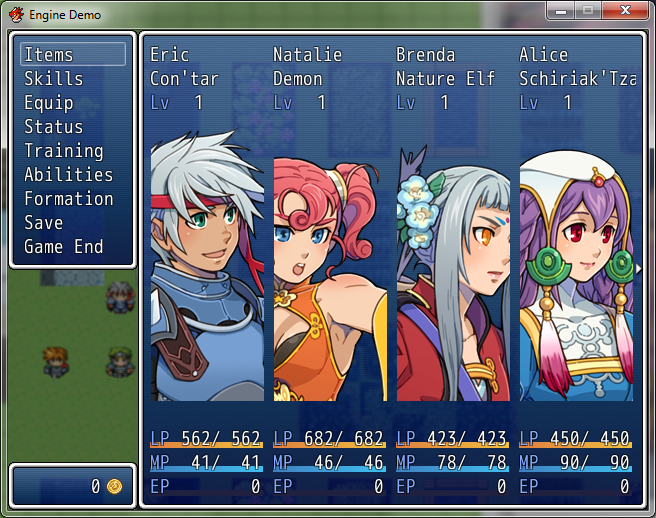
  2. Is there a way to add Trainng and Abilities scenes to custom menu (e. g. Yanfly Engine Ace)?
  3. The current function in the script aliases and adds to the add_main_commands function, so if you place it below regular menu engines it will also add the commands below.


    However, that is not the same as using a menu engine for organizing your main menu - if you want to do that, you need to comment out the lines adding the two new scenes to the main_commands, and instead place these commands inside the script of the menu engine to add them there.


    If you know a bit of scripting, this should be easy - if not, then you'll need a compatibility patch adding the new commands into the other menu engine. Or you have to add the ability system below the other menu system and work with the sorting you'll get then...


    Edit:


    The following picture is an example of using Galv's Menu Layout - no changes, just placing the ability script below the menu layout script, and that was the result:

    Spoiler
    galvmenu.png
  4. So without scripting I won't be able to use it in Yanfly Engine Ace or XaiL System - Menu Delux?
  5. That's awesome, especially since it can be anything defined in a common event(like in your SS, It's clear you are using a dynamic feature script as well, thus allowing you to add/remove features). The ability to make skill trees or whatnot with it is great as well.

    I'm real tempted to work this in my game, but I'm trying to avoid scripts that effects the game directly.

    Maybe down the line, when I'm working on a 2nd game, I'll make full use of that. Nerverless that's a awesome script, great job.
  6. bielau said:
    So without scripting I won't be able to use it in Yanfly Engine Ace or XaiL System - Menu Delux?
    No, that's something different.
    You were specifically asking for the menu part of an engine, and in that case you have to test whether it will work without script modifications or not. And the example with Galv's Menu shows that there is a good chance that it will work without scripting - I just can't guarantee it, you have to test it.


    However, if you're using non-menu-parts, (for example only yanfly's battle engine ace), then there should be no conflict in most cases (again, I can't promise compatibility with all the thousand scripts out there, but there is a good chance).
  7. @bielau

    You dont need to know how to script for adding new commands. It depends on the menu script and how the author handle the commands.

    My script works for default menus and menus which dont change the handling of the commands.

    But In yanfly you can define custom commands in the config section.

    I wrote this snipped, which will make the work work for you:

    module YEA  module MENU    COMMANDS.insert(5, :general_learn)    COMMANDS.insert(6, :e222_ap_view)    CUSTOM_COMMANDS[:e222_ap_view] = [E222::Vocab::VIEW_SCENE , 0, 0, :command_personal]    CUSTOM_COMMANDS[:general_learn] = [E222::Vocab::TRAIN_SCENE, 0, 0, :command_train_e222]  endendPlace it below the yanfly script.

    This adds both commands to the yanfly menu, change the numbers 5 and 6 to the index positions you want the commands be visible.

    I will look at the Menu Delux and will add a snipped for it, too if it needs one.
  8. Thanks Evgenji - it works perfectly!

    And thanks Andar for great script.

     
  9. Evgenji wrote the script - Eugene222 is his old name.


    I just had the idea for it and structured everything for event use.