Hey everybody! [IMG]//rmwforums.s3.amazonaws.com/emoticons/default_biggrin.gif[/IMG] Ok so here's the problem. I got this hidden book shelf image that i want as a door. This hidden book shelf is 2 square long. When I put the door event it cuts off in the left. I need help fixing this and is driving me crazy. I put images to show what I mean. Please help!
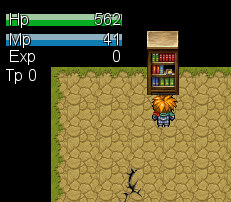
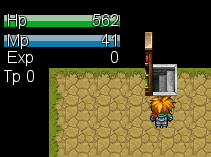
2 pixel doors is cutting off
● ARCHIVED · READ-ONLY
-
-
What does your animation image file looks like?
Seems like you messed up with the section boundary -
This is how the image looks like in my file
Btw I dont know what you mean by section boundary :c
-
Try this using the same method

The boundary I am referring to is something like this

Each separate animation should fall within those boundary to work properly

Edit:
If I have a say in any of these, I rather you use the following instead

The fact that the stairway is not 100% revealed is messing with my nerves. and I just can't ignore it... lol -
OMG DUDE THANKS! You are awesome! I downloaded your png picture and there was only one problem. I had to put a "$" sign in the front and once it did that it worked like magic. Thank you dude. I hope you don't mind but can you explain to me what the signs, "!", "$" mean? Sorry i'm a noob :c
-
The $ before a file name tells the program that there is only one sprite on the sheet, as opposed to a whole sheet of 8.
The ! before a file name tells the program to draw that sprite directly on the map grid, where as without one the sprite is drawn a few pixels above normally.
You can use !$ before a file name to do both things at the same time. -
Regular RTP sprite and grid size is 32x32 pixels.
A regular full sprite sheet is 12 column across and 8 rows high (each row/column is 32 pixels wide) and contains 4 groups of 3x4 sprite sheet (each group occupies 3 columns and 4 rows)
When you have a single 3x4 sprite sheet like the one I uploaded above, you will need to add a $ infront of the image name to tell VXA that it only contains 1 3x4 sprites.
As for the usage of ! symbol.. normally the sprites and animated objects are moved up by 4 pixels when moving/animating.
Adding the ! infront of the image name disables such action. So for your door, I'd recommend that you use ! instead of $. If the height wasn't affected when you put the shelves alongside the RTP tileset shelf, I guess you can get away with keeping the filename starting with $. I am no longer using RMVXA so I cannot confirm this myself. -
Thank you so much guys. I think this post can be closed now. Thank you!